
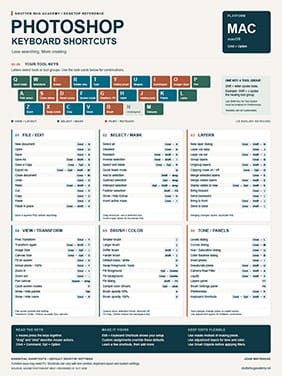
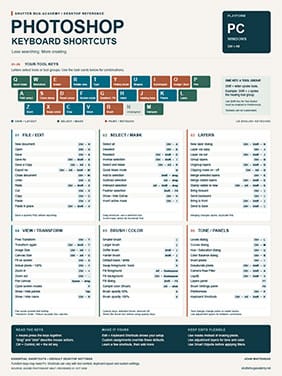
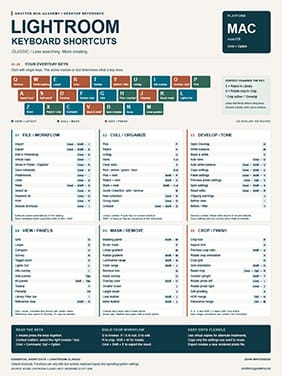
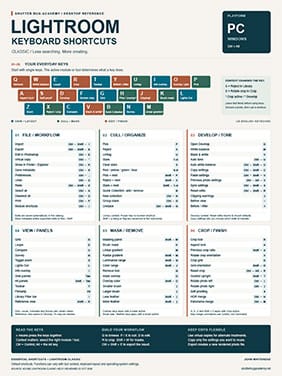
Photoshop and Lightroom Keyboard Shortcuts for PC and Mac
Keyboard shortcuts help you spend less time searching through menus and more time working on your photographs. A single key or key combination can activate a tool, change your view, or run a command without interrupting your editing process.
In Photoshop and Lightroom, those small time savings add up. When you repeat an action dozens of times—or edit hundreds of photographs—moving through menus for every step slows your workflow. Shortcuts make everyday tasks quicker and help you stay focused on the image.
Build a Faster, More Comfortable Workflow
The benefit goes beyond speed. Keyboard shortcuts reduce unnecessary mouse movement and make it easier to switch between tasks. As familiar commands become second nature, you can give more attention to exposure, color, composition, and the creative decisions that shape your photographs.
You do not need to memorize every shortcut. Start with five or six commands you use regularly. Practice them during your normal editing sessions, then gradually add more. Learning shortcuts through repetition is more useful than trying to memorize an entire sheet at once.
Download Your Keyboard Shortcut Guides
Download the Photoshop and Lightroom keyboard shortcut PDFs below. Choose the PC or Mac version for your computer, then print the guides or keep them nearby while you edit.
Use each guide as a reference, learn a few shortcuts at a time, and build a workflow that feels natural. The goal is to make the controls familiar enough that your attention stays on the photograph.